Can not add a Model without id to a ModelCollection error on categories [FIXED]

When I click one of the categories in the Maintenance app, I got the error Can not add a Model without id to a ModelCollection and a blank page.

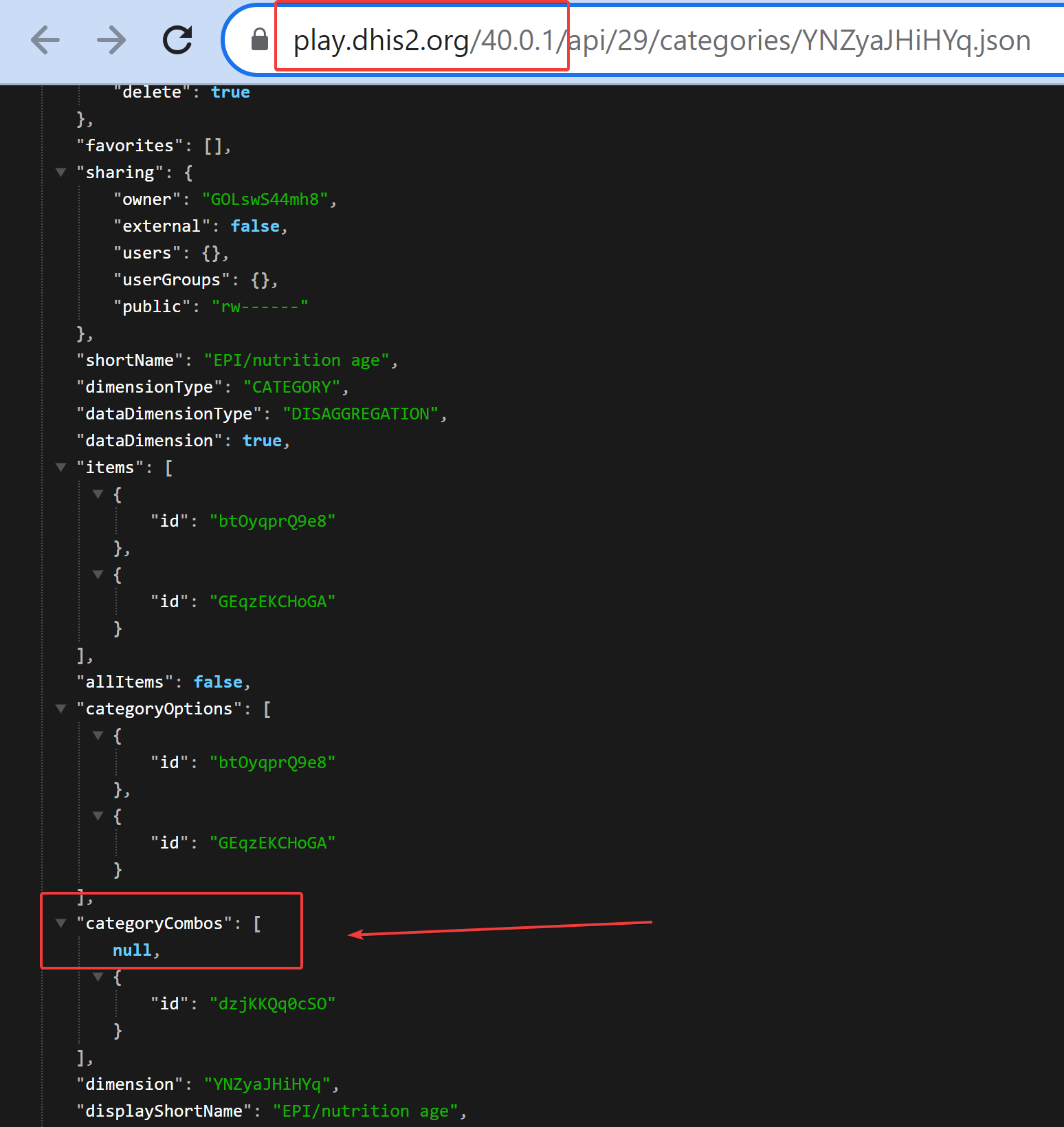
I fetched the category in with the api and find out that the categoryCombo payload on it appears like


            "categoryCombos": [
                null,
                {
                    "id": "K6K4eaEM5K6"
                },
                {
                    "id": "sdfg6yhji8"
                }
            ],

The "id": "sdfg6yhji8" reference a deleted categoryCombo. So I go to the database and manually deleted it. When I fetch the data with api again, it’s now appearing like:


            "categoryCombos": [
                null,
                {
                    "id": "K6K4eaEM5K6"
                }
            ],

When I inspect the Network tab to see what what fetched to the Maintenance app, I got the screenshot below which correspond with the api request.

My question is how do I delete the null value. I have clear the server cache, site cache, reload app but no changes.

I think for this one you need to check the database directly. I searched for the error “Can not add a Model without id to a ModelCollection” and that’s the conclusion…

Before I posted, I also search for existing solution but couldn’t get one. Also I have inspected the database and query the categoryCombo and categoryOptionCombo even with the condition where COC is null nothing was return. I updated the record with the Maintenance App still it is sending the null value.

So far, I have leave it for now but I can edit the categoryCombo. I only hope at some point the system will purge it.

I am experiencing this same issue and have completed the same troubleshooting tasks with no apparent resolution available. 2.39.1.2

I only escaped this when I spin up a new instance. I was unable to fix it.

I’m encountering in the same problem on the same version.

This is the issue here: [DHIS2-15351] - Jira which will be included in the next official release of each branch. We have tested and verified on the development branch of 2.39.3

Still no resolution to fixing this issue. Today, this link doesn’t work and gives us the error:
Can not add a Model without id to a ModelCollection

which redirects to:

@Gassim can you remove the [fixed] tag from the title as the issue is not wholly resolved?

Hi @chase.freeman

Thank you for the notice. It did get fixed for version 2.39 but it wasn’t reported for version 40 but I don’t know if it was already working in version 40 and this bug reappeared?

Yes, same issue that is described in the ticket linked to this topic. :+1: Thanks!

Hi @chase.freeman

As you can see the comment by @viet in the Jira issue, the issue is fixed in version 40.1.0 which is the latest stable version for version 40; so it should be available as soon as you update.

Thanks!

I think the issue still exist even on 2.40.1 and seems to be caused when I reimported the metadata for optionsets etc to update existing ones.

I am facing similar issue with optionsets. I have to delete all optionsets and reimport the metadata.

Hi @stephocay

I followed the steps mentioned in the Jira issue [[DHIS2-15351] - Jira] to reproduce the issue on 2.40.2 and I’m not able to reproduce the issue. Would you please check if you’re facing the issue in 2.40.2?

Thank you!

I have the same problem in version 2.39.3.1 and I upgraded to version 2.40.3 and nothing was resolved. How do I resolve the issue once the system is in use?

@stephocay did you get a solution for optionSets?

I am using: “rev”: “f8428dd”, “version”: “2.40.3”, and I still get the error. When I checked under the optionSets[…], I had null options equal to the number of options in the optionSet (i.e. I have 9 options & 9 nulls).

Good day,

Is there any solution to this, I am using version 2.40.1, and still experiencing the same issue with optionSet.

Any fix for this issue? Still experiencing the same in Version|2.40.3.2 Build revision|3fcd748

The issue is still re-occuring on this version.