When I try to add a filter for ‘Organisation Unit’ to a dashboard containing Line Lists, other visuals (Charts, Pivot Tables) filter as expected, while the Line List visuals do not. Screenshot below for context. Is there any way for the Line Lists visuals within a Dashboard to filter using the Organisation Unit filter?
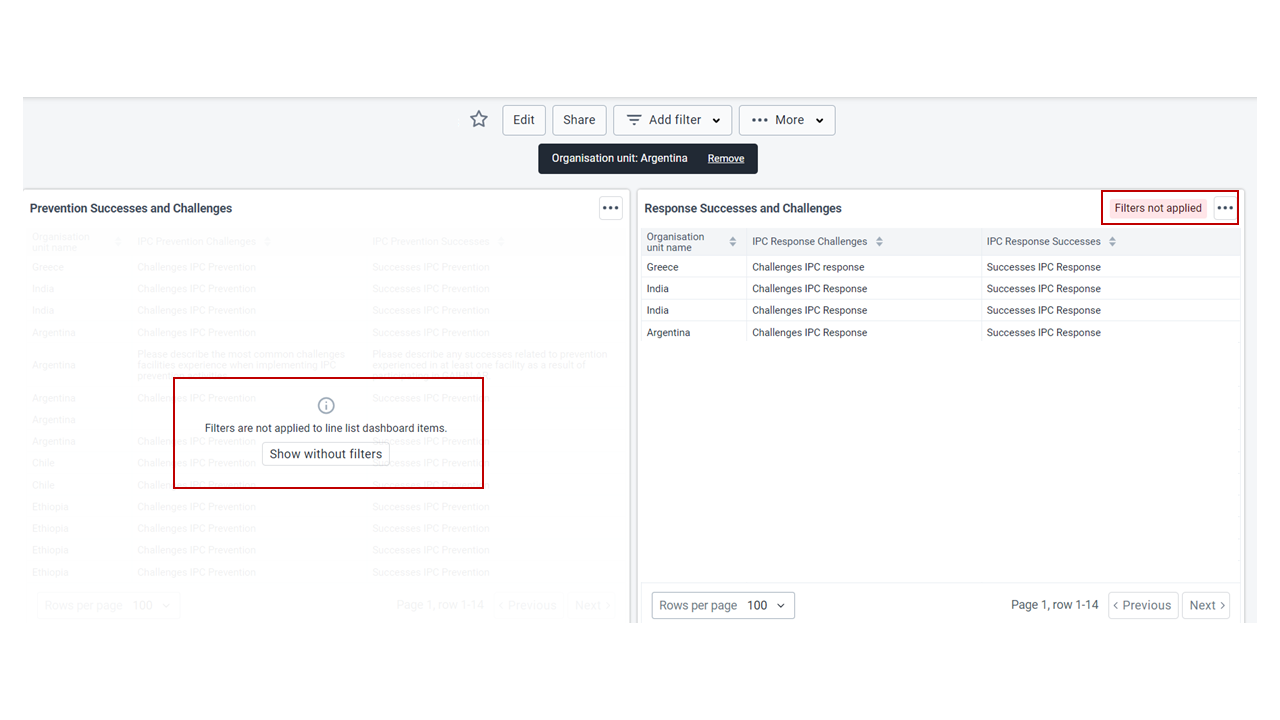
HI @SydneyDaniel,
I’ve asked for support from @dhis2-analytics and the first response is that the filters are disabled for Line Lists because they are not applicable. The filters in the Dashboard are the same as the filters in the Data Visualizer app but for line lists it appears that it is more complicated, so would you kindly explain the use case further?
One recommendation, by @jan, is to use the “user orgunit” for the line lists rather than a fixed OU because this will show the OUs for the user viewing (assuming that this is the expected result) but it will probably help if you explain the use case more.
Thank you!
Thanks for the reply! If you refer back to the screenshot in the original post, we have all line lists configured to use the “user orgunit” rather than a fixed OU, but a good number of our users have access to multiple different org units and would still like to filter down. For example, using the screenshot from the post as a demonstration, if a user wanted to only see line items from Argentina but not see the additional lines from Greece and India, they would be unable to, since the filters do not apply. We have these line lists incorporated into dashboards with visualizations from the Data Visualizer, and it would be extremely helpful for our users to be able to filter the entire dashboard down to see only one org unit (example: Argentina). It is currently a bit confusing on a dashboard when the visualizations filter but the line lists still show all org units. I hope this helps explain!
Is there are progress on this? The expectation is that the Dashboard should function when the OrgUnit is set to “user orgunit.” Unfortunately, the Line-List still doesn’t filter on the Dashboard, the filtering functionality remains non-operational.
Just saying out loud that we have also noticed this and going to see if there is a fix in place with versions available.
Update: only thing I’m seeing is Continue which seems to note that this will never be possible. Shoutout to @Shapr0019 on another post (Period/Org unit filter in Line Listing App - #3 by ramavat):
The issue likely arises because DHIS2 Line Listing App has limited support for global filters such as period and organisation unit on the Dashboard. In short, the main dashboard-level filters do not cascade down or apply directly to the Line Listing App.
This is likely due to the fact that DHIS2 treats the Line Listing App as an external application, not as a core component. That’s why the app must be installed separately — it does not come bundled with the initial DHIS2 installation.
To work around this, go to the top-right corner of your dashboard and open the Line Listing App directly. From there, apply your filters within the app itself
Perhaps @joecooper can shed some more light on what if any plans have been completed/are in the works to better communicate the lack of filter or make it possible?
Hi! The current dashboard filter dialog is basically the left sidebar in Data Visualizer, which is meant for aggregated data and does not work well with tracker data. Technically, it would be possible to apply an org unit filter to line lists as event, enrollment or registration org unit based on the type of line list. However the new event reports app that we plan to release in 43 will have program stage specific org unit dimensions, so a new way to offer dashboard filters is needed in any case. I’ll see if that’s something we can do for 44.
1 Like