Downloading Line List with more than 5000 records (v2.40.3)

Hi,

I am using DHIS2 version 2.40.3.

When I create a Line List report with more than 5000 records, the results are split into pages. To download all patient names, I have to go through each page before downloading.

Is this normal, or should the Download button export all records directly?

Thanks

Hi @rehabm

When you download, what option are you selecting? I tried downloading as CSV and I’m getting the full export (more than 27000).

Would you please try to reproduce the issue in any of the play.dhis2.org instances or share a recording of the issue?

Thank you!

Hi @AL-Gassim Sharaf Addin,

Thank you for your reply.

I’m downloading the report as an Excel file

2025-09-03_17-28-44

The data is not complete unless I go through each page. Without clicking Next, I get an error (see attached video).

Is there any limit in DHIS2 for downloading records that I should be aware of when exporting to Excel?

Best regards,

Hi

It’s possible that there’s a metadata/data issue (possibly an indicator). Could you please try removing all the columns and check one by one which causes the issue? After you figure that out, please share more details about its configuration.

For example, if you try only selecting the first three columns (OU, Incident Date, and Name) it will most probably download the entire list. Please check this.


Update: @rehabm , were you able to figure this out? – Thanks!

So at least according to the screenshot, the reverse proxy is timing out the request. You may need to ask your administrator to increase the timeout there. We usually recommend an absolute maximum of 10 minutes. If this still is not enough time to complete the request, then it could be another performance issue.

Best regards,
Jason

2 Likes

I have the same exact issues , i have version 2.4 as well, under event report , I can not download more than 100 rows, now users will have to download 100 rows, page next download another 100 rows page next and so on, and later merge the files , the problematic field for me is the Main Diagnosis , and Secondary Diagnosis, because if I remove them , then the report will download fullt for over 5000 or 6000 rows, some one sugested line listings app, but this app only download full report when you select code or id , if you select name , then it time out also, and also when u select code or id , it will only download the diagnosis codes and leave the description out.

Thank you. This is exactly the issue I’m facing as well. Your description matches my case perfectly. Export works when those diagnosis fields are removed, but fails or times out when they are included as names.

Hi @rehabm and @Tangi

Thank you for the input, and thanks @Tangi for contributing to understanding the issue. May I ask you both to please check with your server administrator to check the proxy timeout? Please see Jason’s comment:

If after increasing the timeout, there is still an issue. We will need to debug this a bit further but let’s eliminate the timeout issue first.

Thank you!

Helloo,

I have already increased server timeout to 20 minutes , it stil doesnt download,

Anything beyond 10 minutes is not recommended. I would sink this immediately back to 10 minutes.

This can be a laborious problem to diagnose, but the best way to get started it to look at what Glowroot can reveal. Here is an example

Wow, this looks brutal. 10 queries, each of them taking more than 200 seconds to complete.

/app/api/40/analytics 
ERROR
Transaction type: 	Web
Transaction name: 	/app/api/40/analytics
Error: 	java.io.IOException: Broken pipe
exception
Start: 	2026-07-09 7:22:11.020 am (+02:00)
Duration: 	1,383,045.9 milliseconds

Overall, the process took 23 minutes, but note the “Broken pipe”. That means the web proxy killed the connection already.

I don’t know exactly what the problem is in this example, but it looks like the user is asking for some program indicators which are very complex. Each one of them takes a very significant amount of time to calculate. It can be also worthwhile to have a look at this document (which is a bit dated at this point, but does contain some possible levers you can use) Tracker performance at scale - DHIS2 Documentation Depending on your Postgres version, you should be sure that JIT is turned off. It causes unexpected performace degradation.

Custom indexes can be an option you can also explore. Indexes can dramatically speed up certain queries, but are of course not free. They come with a cost of storage and write performance. Careful testing may be required.

Lastly, you may find that the query plan (as revealed by Postgres) is simply not good. You may just have to request less data or use other strategies like SQL views to support retrieval of data which is specific to your workflow. If your analysis reveals particularly bad query plans, you can share them with us here, and we can advise more. Sometimes, we can optimize the way the SQL is generated or the syntax of the program indicator.

There is often not an easy answer, and it can depend a lot on configuration of your system, shape of your database, and the exact query which you are asking for. However, Glowroot can reveal very quickly where the bottleneck is. Whether it can be fixed easily is another problem.

Best regards,
Jason
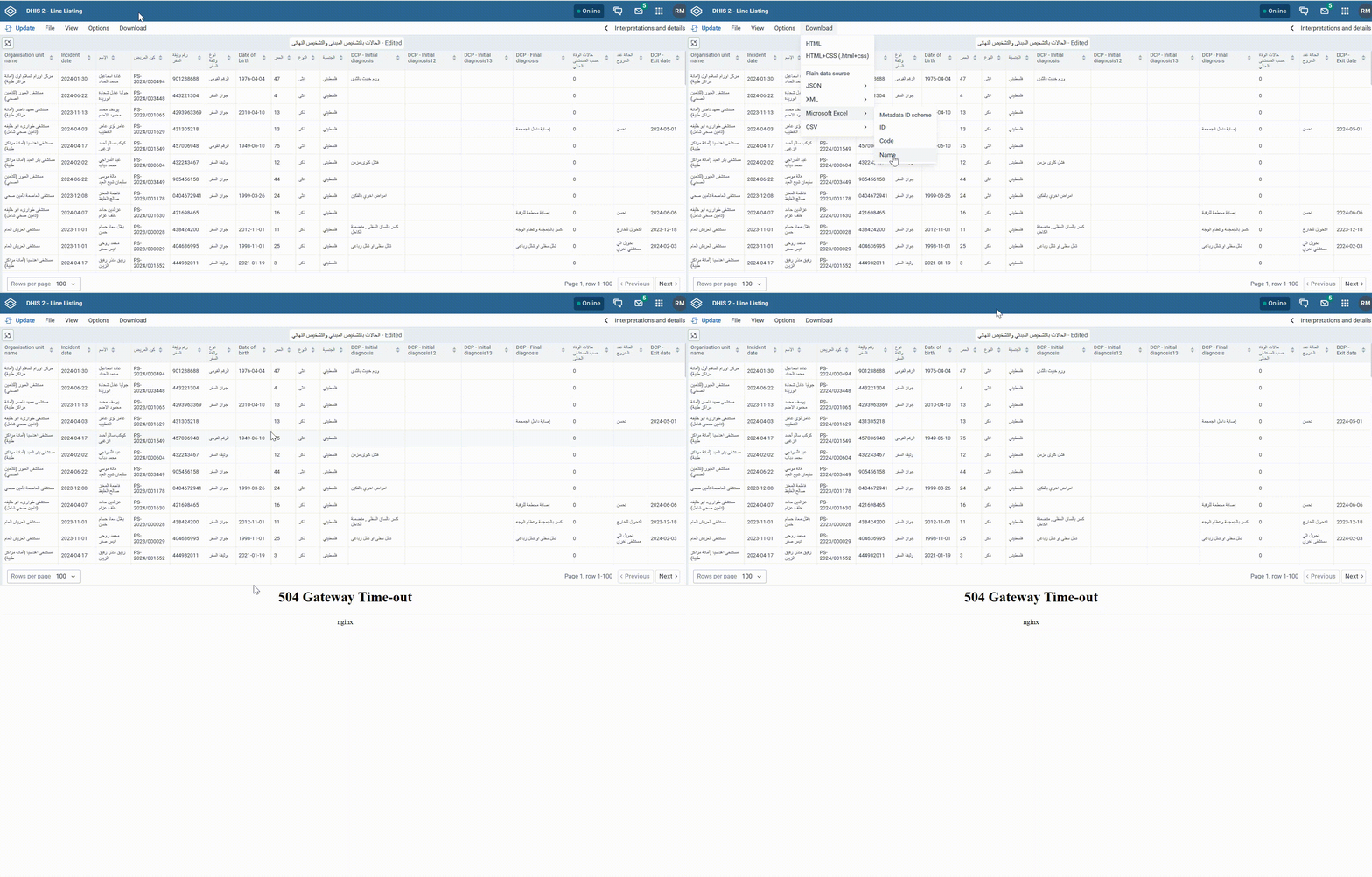
Hi @Jason,

Unfortunately, increasing the reverse proxy timeout did not resolve the issue, and the problem still persists.

Please let me know if you need any additional logs or information to help investigate this issue.

Thank you.

Have you tried supplying a start and end date? By default, the client does not send any date bounds. This leads to an unbounded database query which may never complete. This feature feat: [DHIS2-19144] working lists performance options by JoakimSM · Pull Request #3989 · dhis2/capture-app · GitHub allows you to force the client to specify a default time period for the working list ( e.g last 30 days).

Without seeing a glowroot trace from your request, I don’t know if it’s the same issue, but I strongly suspect it might be.

Best regards,
Jason