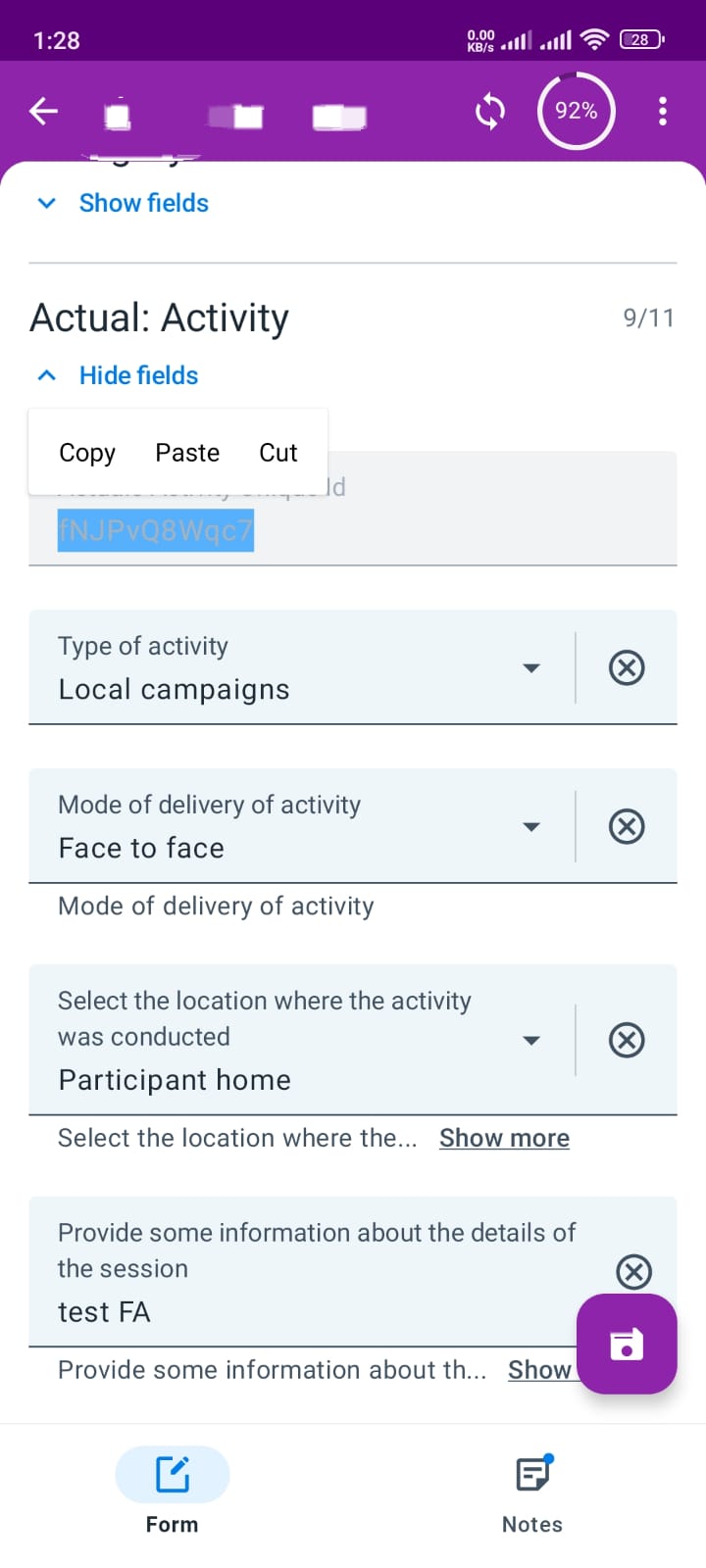
Our users recently updated their Capture app to version 3.1.1.1, and they have encountered an issue with selecting text from read-only fields. We have a read-only field that is automatically generated when an event is created, and users often need to select and copy the value. However, after the update, this functionality no longer seems to be supported.
For reference, I have attached a screenshot from version 3.1.0.1, where selecting and copying from read-only fields was possible.
Could you please look into this issue and let me know if there is a workaround or a planned fix?
thanks for let us know that this issue affects you and sorry for the inconvenience. This is something that started to happen with the recent changes in the inputs and we were aware of it. I am not sure about when it could be fixed, but you can follow it up in this ticket.
Our users copy the content of a field (The patient ID) in order to paste it in another application so the codes are the same in both applicacions. The ID is calculated using a Program Rule
But the attribute is greyed as it is afectaed by the program Rule.
Is there any way we could workarround this situation?
I have tried including in the Rule a Display Text action incluiding the content of the attribute (using a variable). But the text that is shown in the Feedback or The Indicator widget is not selectable anyway.
Another option is to use an Automatically generated type attribyute for the Patient ID. But I am afraid this will conflict with the already created patients.