Hi @Markus and @Karoline
I will explain here why we opted for using a TEA that we called Patient follow-up status to overcome the current DHIS2 limitations. This TEA is updated as the patient progresses through the workflow: patient visits (program stage visit), new visit is scheduled, patient becomes overdue, patient is called (program stage calling report) and eventually they return to care and the overdue event is reused to enter this new visit. The TEA is updated using triggers in the DB, and the possible values are illustrated here:
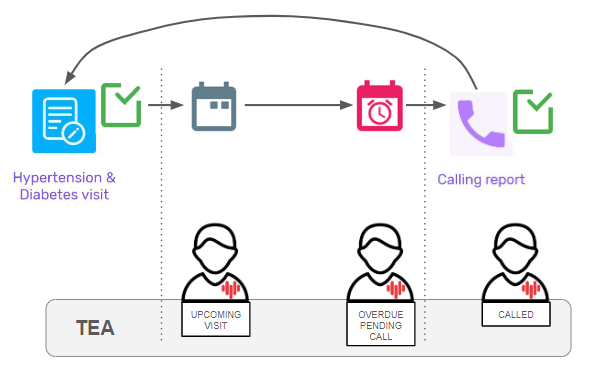
The first thing that I noticed, is that event status in programstageinstance table remains SCHEDULE even though the patient is overdue. This means that Capture shows overdue patients by looking at their latest event due date, but the event status is never updated in the backend, so it is not worth using this status in a PR to filter overdue patients. I also noticed that the Android app behaves differently and after syncing an overdue patient, in some cases the event status in the backend changed to OVERDUE.
The first thing this solution does is to solve this Jira ticket:
https://dhis2.atlassian.net/browse/DHIS2-16885
Since now the patient status is in a TEA, we can easily show the Program Stage “Calling report” for those patients whose TEA value is OVERDUE_PENDING_CALL. Here the difficulty was to have a PR showing a Program Stage based on an information which should be stored in a previous event entered for a different PS (event status is overdue).
Similarly, we faced the same problem with working lists. We can only filter by data in events for a specific Program Stage. But what if we want to show the patients that are overdue which have not been called? It is not possible because overdue status is on an event entered for PS Visit, whereas the calling information is in a different event for PS Calling report. Having the value in a TEA solves the problem.
And we also found this solution to work better for line listing.
To sum up, the capacity of doing cross events filtering (line list, working list) and conditions which affect a PS from data entered in a different PS was required for our use case and using a TEA is a good workaround. Unfortunately not been able to assign this value using PRs, we had to do these updates in the backend using triggers, which means the users are forced to sync their android devices to be able to see the latest info in their working list and to be able to access calling report stage.